
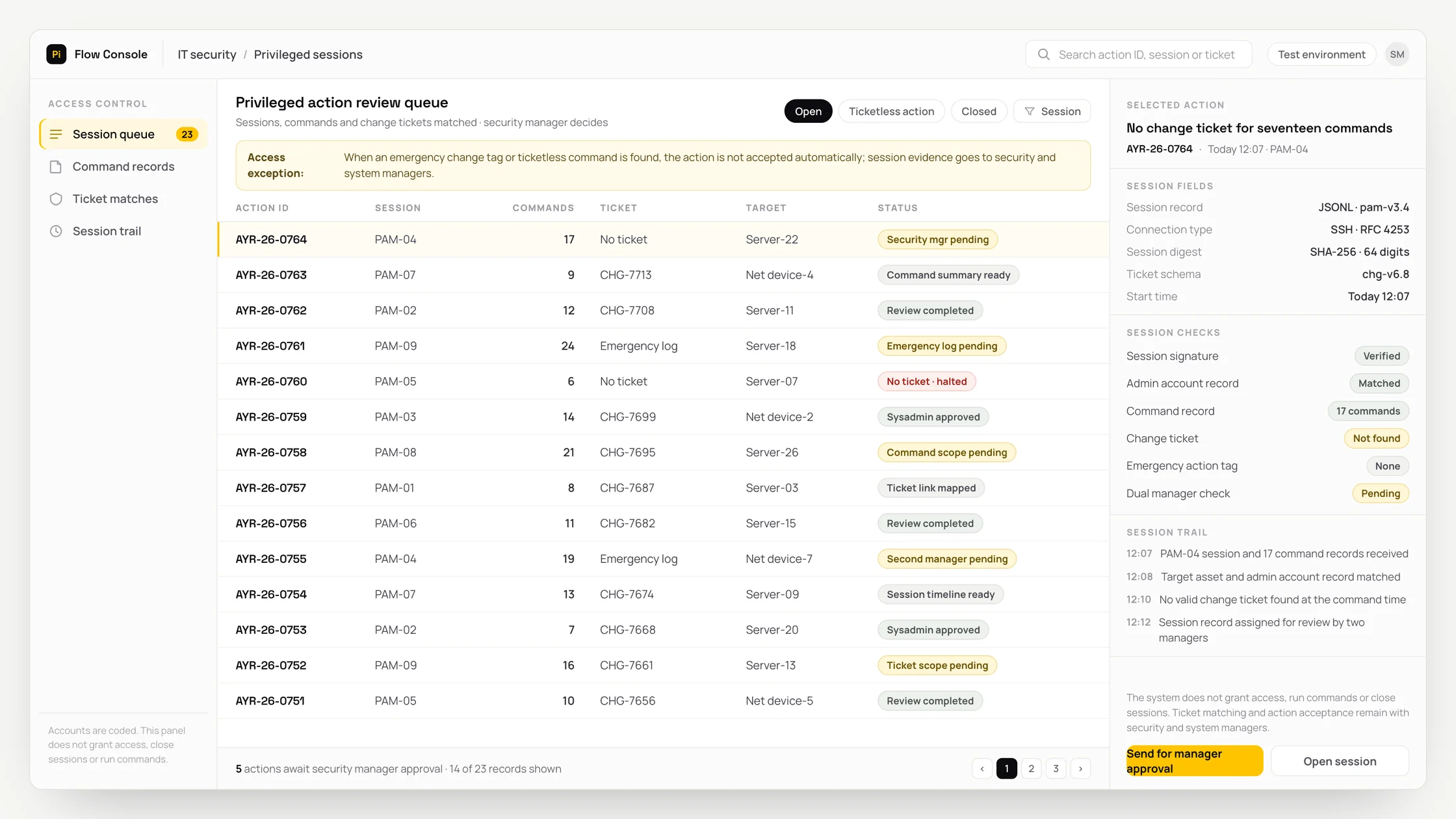
The problem
In day-to-day operations, privileged sessions, commands and change tickets arrive through different systems and event records, preventing the team from seeing the case on a single timeline.
As a result, source links can be lost while the match between the activity and its approval record is prepared, the case can be routed to the wrong team, and the basis for the technical decision can remain unclear.
An incomplete workflow may overlook an emergency change or activity without a ticket, while an incorrect system action could lock an administrator account.
What we set out to improve
- Time taken for the draft match between the activity and its approval record to be ready for specialist review
- Correct referral of records involving an emergency change or activity without a ticket to the appropriate specialist queue
- Record of recommendations corrected or rejected by the security and systems administrator
How the system works
- 01 Retrieve privileged sessions, commands and change tickets from authorised sources
- 02 Verify the source, timestamp and record identifier
- 03 Add the relevant asset, user, shop, vehicle or content context
- 04 Prepare a draft match between the activity and its approval record
- 05 Compare the draft with technical rules and authority boundaries
- 06 Check for exceptions: an emergency change or activity without a ticket
- 07 Obtain the security and systems administrator's approval, correction or rejection
- 08 Write the input, recommendation, changes and final decision to the audit log
Methods we used
- Source- and time-traceable data extraction for privileged sessions, commands and change tickets
- Structured output that restricts the activity and approval-record match fields to technical rules
- An exception gate that separates emergency changes or activity without a ticket from system action
- An authorised queue that presents the evidence and recommendation together for the security and systems administrator
- Duplicate-processing controls and a rollback record to address the risk of locking an administrator account
Where people stay involved
The security and systems administrator is the final decision-maker. If there is an emergency change or activity without a ticket, the workflow stops and the evidence is referred to the specialist queue. The system does not make blocking, access-change, technical intervention or physical action decisions on its own.
Data and security
Only fields required for the task are processed from privileged sessions, commands and change tickets. Source-system permissions are preserved, and unnecessary personal, technical and security-sensitive data is minimised before being sent to the model. Every retrieval, recommendation, human change and target-system action is written to the audit log.
Who this suits
A good fit
- Teams that conduct recurring IT security reviews
- Companies with defined source ownership and approval responsibility
- Organisations that want exceptions to remain under human oversight
Not a good fit
- Organisations whose source data is not current
- Operations without a designated decision-maker and rollback process
- Operations where the existing method is sufficient for the low volume
Frequently asked questions
What data is used?
Privileged sessions, commands and change tickets are used. The exact connections, fields and retention limits are determined during the access review.
How are exceptions handled?
If there is an emergency change or activity without a ticket, the workflow stops. The record is referred to the security and systems administrator's queue with its source evidence.
Does the system act on its own?
No. Because of the risk of locking an administrator account, the final technical, security or access decision remains with a person; the recommendation and decision are recorded separately.
Project led by:DijitalPi
✦ PI ASSISTANT · ARTIFICIAL INTELLIGENCE
onlineAsk the DijitalPi AI Assistant your question
No need to fill in a form and wait for a reply — write your question and let Pi, trained on DijitalPi's 20 years of know-how, answer within seconds.
- Instant answers, 24/7
- Service-specific context — no generic replies
- Can connect you to a free consultation if you wish
Pi Assistant answers are for information purposes; for a proposal get in touch.
ASK AI ABOUT DIJITALPI
Let an AI explain what DijitalPi does.
Opens your chosen assistant with a ready research prompt. It reads the site live and answers.
 Cookie preferences
 We use cookies to improve your experience and to analyse site traffic anonymously. Details: Cookie Policy · Privacy