
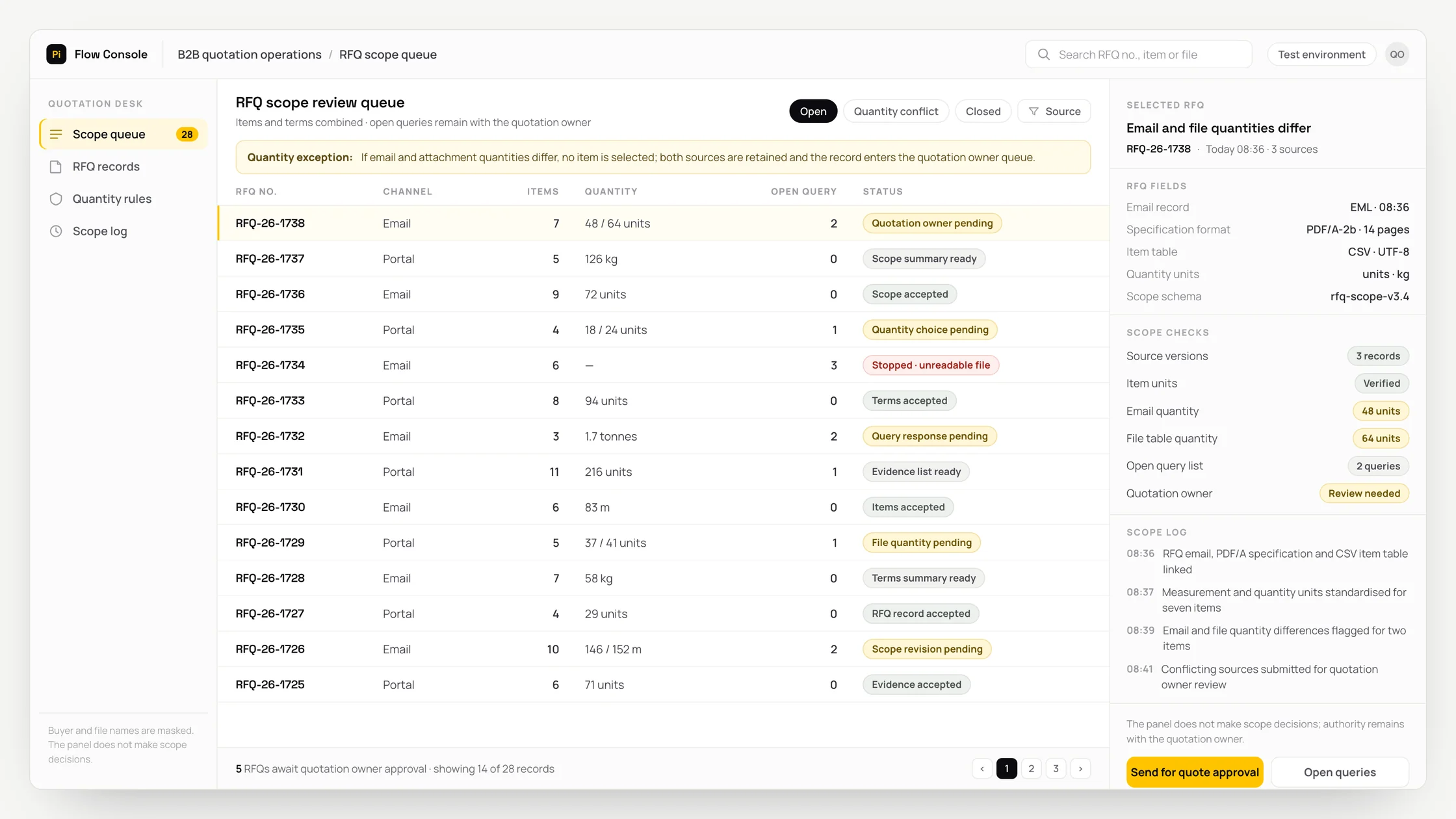
The problem
When the RFQ email, attachments and technical specification are held in separate sources, their fields must be matched by hand before a list of items, terms and open questions can be prepared.
The quotation manager must compare every suggestion in the list of items, terms and open questions with its source record; missing or conflicting evidence must not replace the final decision.
If a conflict between quantities in an attachment and the email is not set aside for review, a quotation could be issued with an incomplete scope; the record must not proceed without a human decision.
What we set out to improve
- Time taken for a draft list of items, terms and open questions, together with its supporting evidence, to reach the quotation manager for review
- How records set aside for human review because quantities in an attachment and the email conflict are resolved
- Number of suggestions corrected after identifying a risk that a quotation could be issued with an incomplete scope
How the system works
- 01Retrieve the RFQ email, attachments and technical specification from permitted sources using the record identifier
- 02Link source, date and version information to the shared work record
- 03Validate fields and units
- 04Prepare the list of items, terms and open questions with its supporting evidence
- 05Check for an exception: quantities in an attachment and the email conflict
- 06Have the quotation manager accept, revise or reject the suggestion
- 07Record the approved decision and its source in the processing log
Methods we used
- A source-identified common data schema for the RFQ email, attachments and technical specification
- A decision structure that separates deterministic rules from AI suggestions
- A review screen showing the list of items, terms and open questions alongside the underlying source evidence
- A mandatory human review queue when quantities in an attachment and the email conflict
- An event identifier that prevents duplicate processing
Where people stay involved
The quotation manager compares the list of items, terms and open questions with the supporting record. The workflow pauses when quantities in an attachment and the email conflict. The responsible person can revise or reject the suggestion, or request further information.
Data and security
Only the fields required for this decision should be processed from the RFQ email, attachments and technical specification. Access to the source systems must be authorised separately from the quotation manager role, and personal data, commercial information and technical secrets must not be passed into the model context unnecessarily. Reading, suggestions and human decisions must be logged separately.
Who this suits
A good fit
- Teams that regularly prepare lists of items, terms and open questions
- Organisations that combine RFQ emails, attachments and technical specifications by hand
- Companies that want people to retain control of exception decisions
Not a good fit
- Operations where source data is not current and consistent
- Operations where responsibility for the quotation manager role has not been defined
- Operations where AI suggestions would be implemented without review
FAQ
Frequently asked questions
What data does the system use?
RFQ emails, attachments and technical specifications can be received through an API or controlled file transfer. Fields whose source and version cannot be established are not treated as confirmed information.
When does the workflow stop?
The record goes to the quotation manager for review when quantities in an attachment and the email conflict. If supporting evidence is missing, no action is taken in the target system.
Does AI implement the decision on its own?
No. The list of items, terms and open questions remains a draft until the quotation manager approves it. Acceptance, revision and rejection are recorded in the processing log as human decisions.
Project led by: DijitalPi
✦ PI ASSISTANT · ARTIFICIAL INTELLIGENCE
onlineAsk the DijitalPi AI Assistant your question
No need to fill in a form and wait for a reply — write your question and let Pi, trained on DijitalPi's 20 years of know-how, answer within seconds.
- Instant answers, 24/7
- Service-specific context — no generic replies
- Can connect you to a free consultation if you wish
Pi Assistant answers are for information purposes; for a proposal get in touch.
ASK AI ABOUT DIJITALPI
Let an AI explain what DijitalPi does.
Opens your chosen assistant with a ready research prompt. It reads the site live and answers.
 Cookie preferences
We use cookies to improve your experience and to analyse site traffic anonymously.Details: Cookie Policy · Privacy