
The problem
Monthly client reports were prepared by hand: analytics, advertising, search, CRM and social media platforms had to be opened separately, with figures copied one by one.
Figures could shift during copying, and errors were sometimes noticed only after a report had been sent. Because different people prepared each report, formatting and the depth of commentary varied between clients.
Preparation took days, so the data could be stale by the time the report reached the client; a decline that needed attention in the middle of the month might not be discussed until month-end.
What we set out to improve
- Time required to prepare a client report
- Number of numerical errors caused by manual transfer
- Consistency of report format and depth across clients
- Delay between the period covered by a report and its sending date
How the system works
- 01Connect to analytics, advertising, search, CRM and social data sources
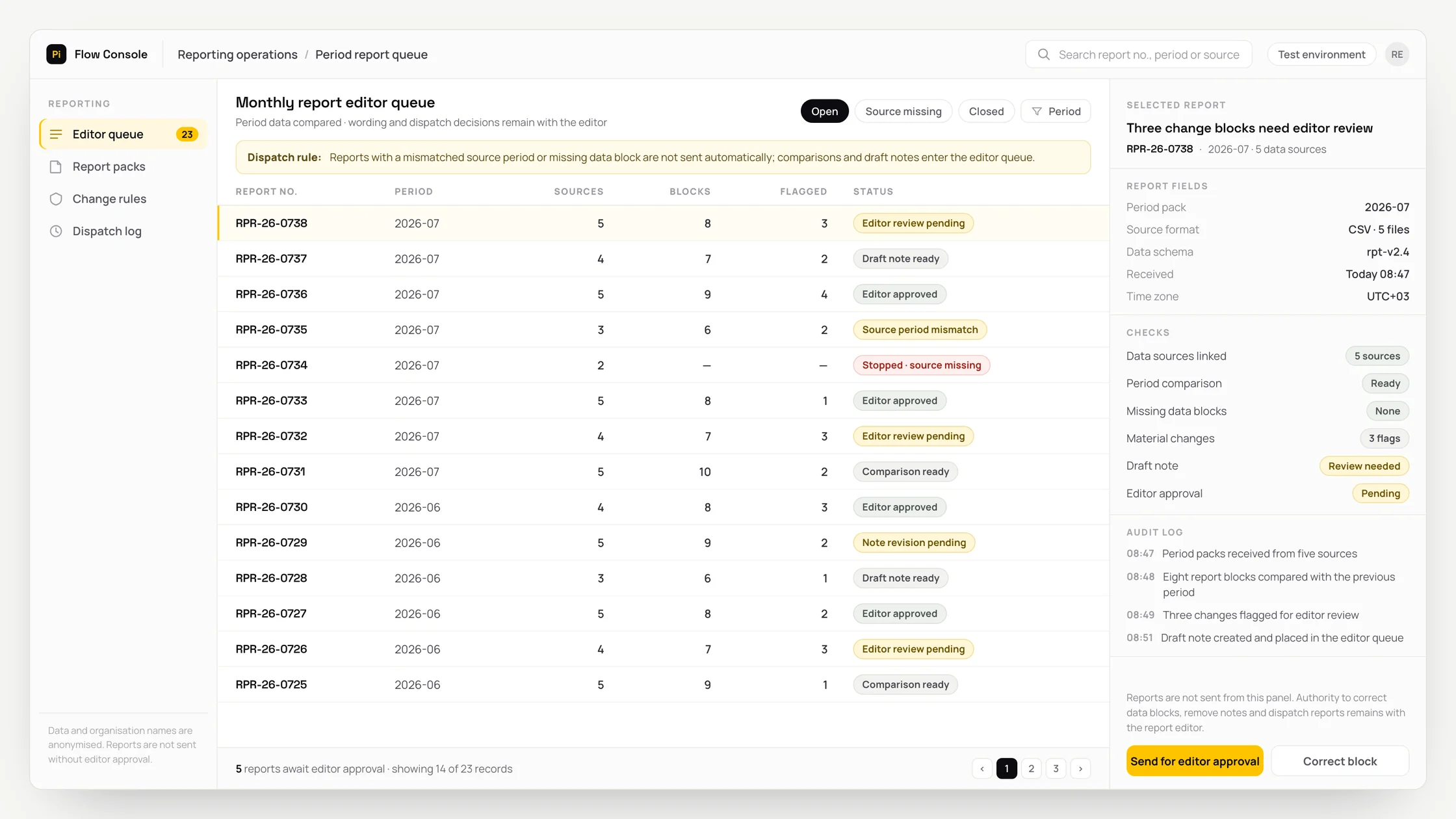
- 02Retrieve period data and compare it with the previous period
- 03Select material changes above the threshold and filter out noise
- 04Prepare a commentary draft for each section
- 05Have an editor read, revise and approve the draft
- 06Generate a single-file report and send it to the client after approval
- 07Record the send event and prevent duplicate delivery
Methods we used
- Direct API connections to data sources, without screenshots or manual exports, remove copying errors at source
- Period comparisons and all figures calculated in code
- Threshold-based selection, so the report includes material deviations rather than every metric
- Commentary drafted by a language model, which interprets only the figures supplied to it and does not generate the figures
- A template engine that creates one file containing charts, tables and commentary
- A sending lock and same-period check
Where people stay involved
A report is not sent without an editor's approval. The AI-generated commentary draft is shown to the editor first; the editor can revise the text, remove an entire section or stop the report. The sending step runs only after approval.
What we tried that did not work
Giving raw data directly to a language model and asking it to write the report: the model may fill perceived gaps and introduce figures that are not present. The remedy is to calculate figures in code and ask the model only for commentary.
Putting every metric in the report: the result becomes bloated and difficult to read. Applying thresholds and selecting only material changes proved more useful than producing a long report.
Relying on a single scheduled task for delivery: if the task is triggered twice, the client can receive two reports. Delivery should not be enabled without a same-period check and a lock file.
Showing only percentage change: a large percentage rise can be meaningless when the starting value is small. Commentary can mislead unless the absolute figure is included as well.
Data and security
Report data is read from each client's own accounts and used only to produce that client's report. Content sent to the language model is limited to the metrics being interpreted; client lists, personal data and raw records are excluded. Access permissions are separated by client, and every report sent is logged.
Who this suits
A good fit
- Agencies and service companies that send regular reports to multiple clients
- Teams that compile reports by hand from several sources
- Companies seeking a standard because report format varies between authors
Not a good fit
- Operations with one client and one data source, where the platform's built-in report is sufficient
- Operations whose data sources provide no API or for which access permission cannot be obtained
- Operations where every report requires wholly bespoke analysis, as the workflow can assist with data collection but not replace that analysis
FAQ
Frequently asked questions
Can AI introduce an incorrect figure into the report?
The model does not calculate the figures. Code retrieves and calculates every metric from the data sources; the model receives only the prepared figures and is asked to draft commentary on them.
Is the report sent to the client without review?
No. It is sent only after editor approval. The approval step could be removed, but we do not recommend this because a commentary draft can require contextual corrections.
Which sources can be connected?
Any source that provides a suitable API. Common examples include analytics, advertising, search, CRM and social media platforms. If a source has no API, that section is supplied manually or omitted.
How long does implementation take?
The duration depends on the number of sources and how quickly access permissions can be obtained. Waiting for access often takes longer than the implementation work itself.
Project led by: DijitalPi
✦ PI ASSISTANT · ARTIFICIAL INTELLIGENCE
onlineAsk the DijitalPi AI Assistant your question
No need to fill in a form and wait for a reply — write your question and let Pi, trained on DijitalPi's 20 years of know-how, answer within seconds.
- Instant answers, 24/7
- Service-specific context — no generic replies
- Can connect you to a free consultation if you wish
Pi Assistant answers are for information purposes; for a proposal get in touch.
ASK AI ABOUT DIJITALPI
Let an AI explain what DijitalPi does.
Opens your chosen assistant with a ready research prompt. It reads the site live and answers.
 Cookie preferences
We use cookies to improve your experience and to analyse site traffic anonymously.Details: Cookie Policy · Privacy