
The problem
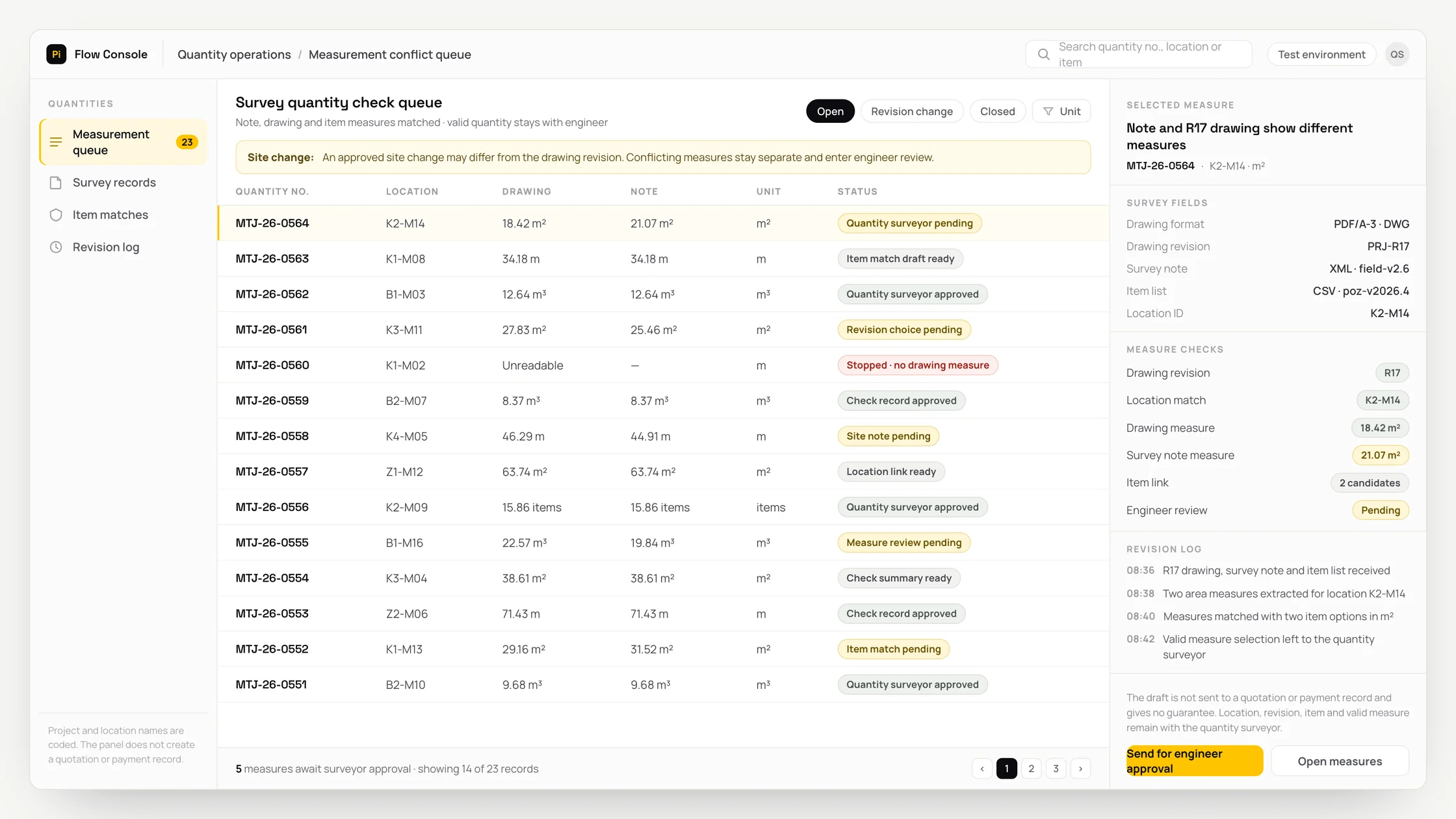
In day-to-day operations, site notes may differ from drawings. When survey notes, drawings, revisions, work-item lists and units of measurement are spread across different screens, documents or team records, the issue may not be noticed in time.
This fragmented data delays preparation of the quantity check draft and forces staff to search for supporting records again by hand. Before deciding, the quantity surveyor must complete missing fields and verify each inconsistency individually.
A common exception is that an approved site change may differ from the project design. If this context is not checked, an incomplete or incorrect automation could carry an incorrect quantity into a quotation or progress claim, so the output cannot be acted on directly.
What we set out to improve
- Share of items corrected by the quantity surveyor
- Share of outputs corrected or rejected by the quantity surveyor
- Time between the source record and the review output
How the system works
- 01Define the review scope and the authorised quantity surveyor role
- 02Collect the inputs: survey note, drawing, revision, work-item list and unit of measurement
- 03Check the source identifier, date, version and data freshness
- 04Extract the measurement and location
- 05Match the record to the revision and work item
- 06Check the exception: an approved site change may differ from the project design
- 07Place low-confidence or conflicting records in a separate human review queue
- 08Write the source identifier, rule, output and timestamp to the audit trail
- 09Have the quantity surveyor approve, correct, defer or reject the output
Methods we used
- Extraction with source-page and revision references
- Source, format, version and required-field checks for survey notes, drawings, revisions, work-item lists and units of measurement
- A missing-data alert instead of an estimate when inputs are absent or conflicting
- Separate handling of exceptions and the main rule
- Joint retention of the source identifier, rule result, quantity check draft and human decision
Where people stay involved
The system stops after preparing the quantity check draft. The quantity surveyor reviews the sources and the exception, then approves, corrects or rejects the output. Direct execution remains disabled because an incorrect quantity could be carried into a quotation or progress claim; the system does not replace professional judgement.
Data and security
Access to survey notes, drawings, revisions, work-item lists and units of measurement is limited to the minimum permissions needed for the task. Identifiers and sensitive fields are masked where possible, and only the necessary section is sent to the model rather than the full raw file. Access, output and the quantity surveyor's decision are logged; production use does not begin until the organisation approves the retention period and data location.
Who this suits
A good fit
- Projects with disciplined revision control
Not a good fit
- Teams seeking final quantities without human review
FAQ
Frequently asked questions
Which inputs are used?
Survey notes, drawings, revisions, work-item lists and units of measurement are used. If a required field is missing, the system does not produce a definitive result and flags the missing source for review by the quantity surveyor.
At what point does a person decide?
The workflow stops when the quantity check draft is ready and waits for the quantity surveyor's approval. The surveyor can correct, defer or reject the output with reasons.
Can the output be audited?
The design retains the source identifier, applied rule, exception, output and human decision together. This makes it possible to review how each source record led to a recommendation.
Project led by: DijitalPi
✦ PI ASSISTANT · ARTIFICIAL INTELLIGENCE
onlineAsk the DijitalPi AI Assistant your question
No need to fill in a form and wait for a reply — write your question and let Pi, trained on DijitalPi's 20 years of know-how, answer within seconds.
- Instant answers, 24/7
- Service-specific context — no generic replies
- Can connect you to a free consultation if you wish
Pi Assistant answers are for information purposes; for a proposal get in touch.
ASK AI ABOUT DIJITALPI
Let an AI explain what DijitalPi does.
Opens your chosen assistant with a ready research prompt. It reads the site live and answers.
 Cookie preferences
We use cookies to improve your experience and to analyse site traffic anonymously.Details: Cookie Policy · Privacy