
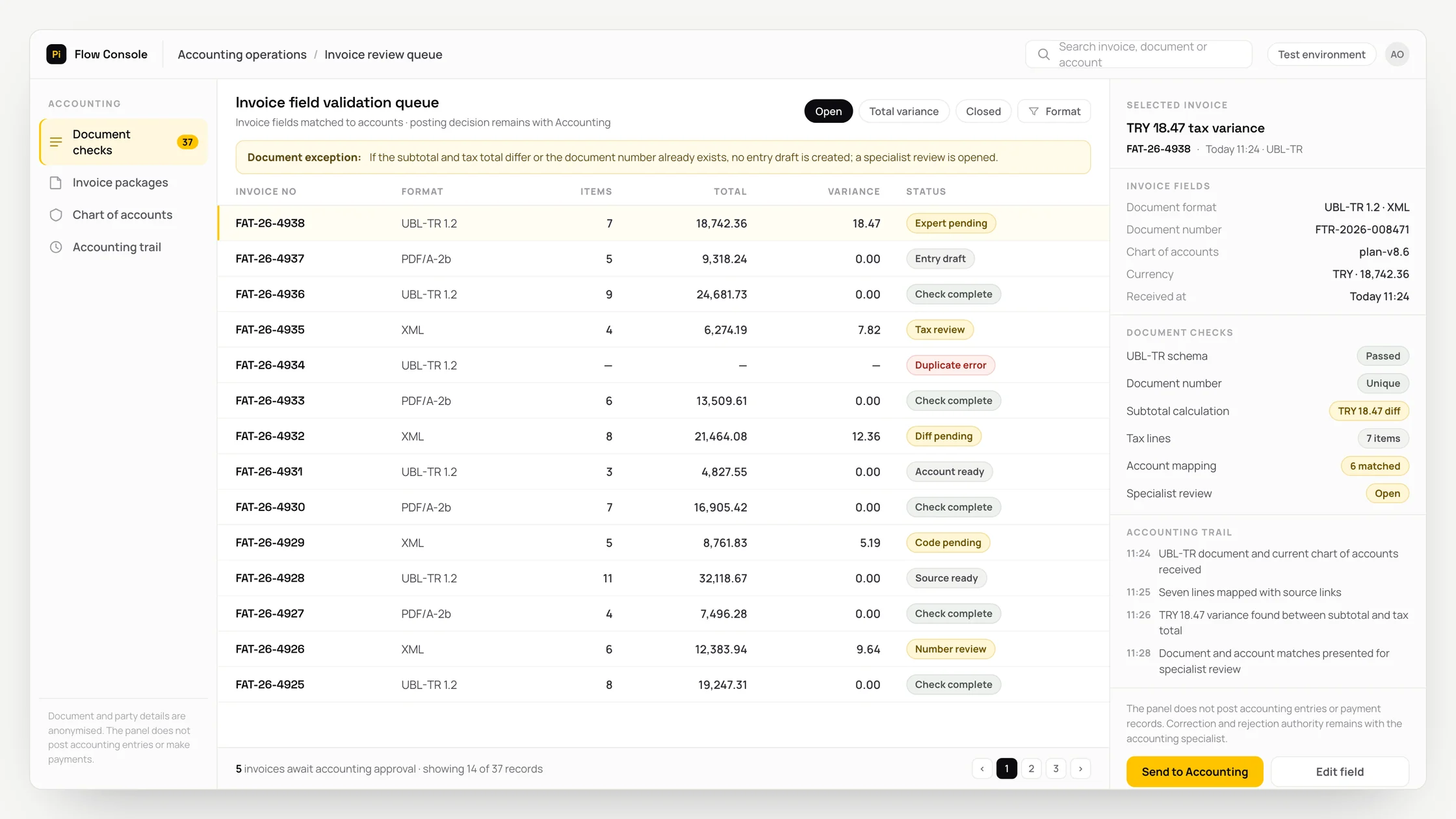
The problem
In day-to-day operations, invoice documents and the chart of accounts arrive through different systems and files, preventing the team from reviewing the same case in one view.
As a result, the link to source evidence can be lost while source-located accounting fields are prepared, leading to repeated checks and uncertainty about the basis for the decision.
Incomplete automation may overlook a totals discrepancy or duplicate document, while incorrect automation risks creating an incorrect tax record.
What we set out to improve
- Time taken for the source-located accounting-field draft to be ready for review
- Correct routing of records with a totals discrepancy or duplicate document to the appropriate specialist queue
- Record of suggestions corrected or rejected by the accounting specialist
How the system works
- 01Retrieve the invoice document and chart of accounts from authorised sources
- 02Verify the source system, record identifier and recency information
- 03Map the fields to the target process schema
- 04Prepare the source-located accounting-field draft
- 05Compare the draft with business rules and source records
- 06Check for an exception: a totals discrepancy or duplicate document
- 07Have the accounting specialist approve, revise or reject the suggestion
- 08Write the input, suggestion, changes and final decision to the audit log
Methods we used
- Source-traceable data extraction for the invoice document and chart of accounts
- Structured output that limits the source-located accounting fields through business rules
- An exception gate that separates cases involving a totals discrepancy or duplicate document
- A queue that shows the accounting specialist the source evidence and suggestion together
- Duplicate-processing controls and a reversal record to reduce the risk of an incorrect tax record
Where people stay involved
The accounting specialist is the final decision-maker. The workflow pauses for a totals discrepancy or duplicate document and presents the case to the specialist with its supporting records. The specialist can revise or reject the suggestion, or stop the process.
Data and security
Only fields required for the task are processed from the invoice document and chart of accounts. Source-system permissions are preserved, and personal or commercially sensitive data is minimised before being passed to the model. Every read, suggestion, human change and write to the target system is logged.
Who this suits
A good fit
- Finance teams that perform repetitive reviews
- Companies with defined ownership for sources and approvals
- Organisations that want exceptions to remain under human supervision
Not a good fit
- Operations where source data is not current
- Operations where the decision owner and reversal process are not defined
- Operations where the existing method is sufficient for the low volume
FAQ
Frequently asked questions
What data is used?
The invoice document and chart of accounts are used. The exact connections, fields and retention limits are defined during the access review.
How are exceptions handled?
The workflow pauses for a totals discrepancy or duplicate document. The record is placed in the accounting specialist's queue with its source evidence.
How is incorrect automation controlled?
Because of the risk of creating an incorrect tax record, no final action is taken without human approval. The source, suggestion and human decision are recorded separately.
Project led by: DijitalPi
✦ PI ASSISTANT · ARTIFICIAL INTELLIGENCE
onlineAsk the DijitalPi AI Assistant your question
No need to fill in a form and wait for a reply — write your question and let Pi, trained on DijitalPi's 20 years of know-how, answer within seconds.
- Instant answers, 24/7
- Service-specific context — no generic replies
- Can connect you to a free consultation if you wish
Pi Assistant answers are for information purposes; for a proposal get in touch.
ASK AI ABOUT DIJITALPI
Let an AI explain what DijitalPi does.
Opens your chosen assistant with a ready research prompt. It reads the site live and answers.
 Cookie preferences
We use cookies to improve your experience and to analyse site traffic anonymously.Details: Cookie Policy · Privacy