
The problem
Businesses send documents by email or secure form and use WhatsApp to say what they have submitted. Accounting staff bring this information together under the client and period by hand.
When expected-document lists and received files are kept separately, each arrival requires another check of the missing list. Avoiding repeat requests depends on staff follow-up.
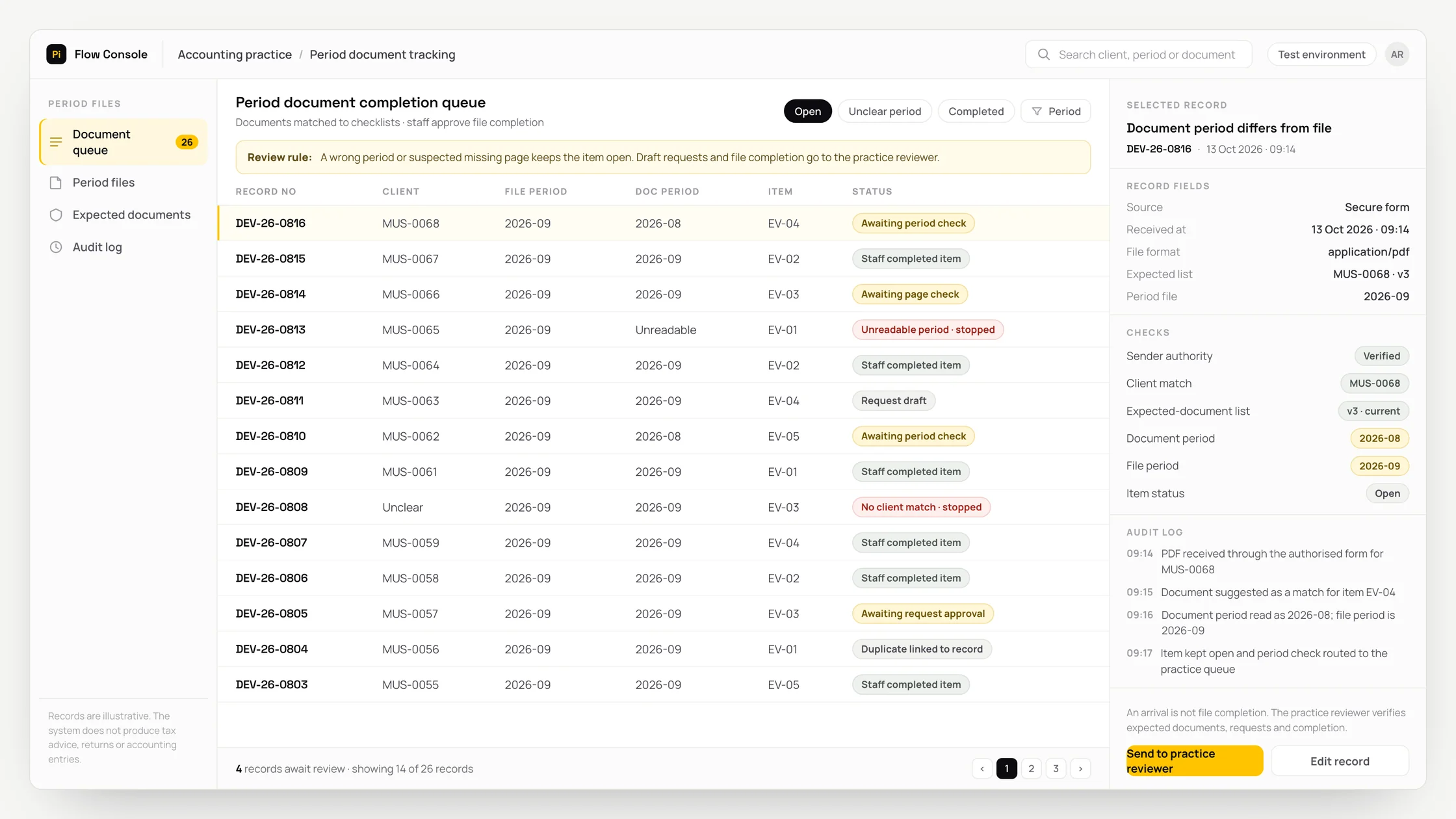
A document for the wrong period or a suspected missing page leaves completion uncertain. The request for outstanding documents then needs separate preparation.
What we set out to improve
- Incoming files are linked to the correct client, period and expected-document item
- Duplicates, wrong-period documents and suspected missing pages are shown separately
- New documents trigger reconsideration of related tasks and staff approve completion of the period file
How the system works
- 01Define the expected-document list and responsible person for each client and period.
- 02Match files received by email or secure form to the authorised sender, client code and period. Link submission notes received through the official WhatsApp Business Platform to the record; separate sensitive fields before reading.
- 03OCR converts text in images into readable text. Suggest the document type and period, linking repeat files to the existing record.
- 04Match incoming documents to items on the expected list. Show wrong-period documents and suspected missing pages separately to staff.
- 05Prepare missing-document tasks and draft requests containing a secure upload link for the reviewer.
- 06Let staff approve the request and the period file’s completion status. Reopen the related task for assessment when a new document arrives.
Methods we used
- Maintain expected-document lists by client and period, assessing incoming files against them.
- Show suggested document types and periods with their source files, leaving unreadable fields blank.
- Do not create another document item for a duplicate file; wrong-period and missing-page flags require separate review.
- Base draft requests on the current task list and include a secure upload link; a document arrival triggers reassessment of its task.
Where people stay involved
The accounting reviewer decides which documents are expected and whether a received document meets the need. Non-arrival alone does not establish that a document is missing; it is assessed against the current expected list. Staff approve requests and completion of the period file. The system does not provide tax interpretations, prepare tax returns or create accounting entries.
Data and security
Account, identity and employee information is minimised before any external reading service receives it. Documents such as payroll have separate access permissions; only fields needed for period tracking are processed. Full account or identity numbers are not requested through WhatsApp; sensitive documents use a secure upload form. Permission and messaging-window rules apply. Source files, extracted fields and corrections remain linked; instructions inside documents are not executed. Retention and deletion rules are agreed with the practice.
Who this suits
A good fit
- Accounting practices collecting period documents from several businesses
- Accountancy teams tracking expected and received documents by client
- Practices with a reviewer who can maintain expected-document lists and approve file completion
Not a good fit
- Practices whose existing document collection software adequately tracks missing items and period completion
- Teams unable to define expected-document lists by client and period
- Businesses expecting document tracking to produce tax interpretations, returns or accounting entries
FAQ
Frequently asked questions
Who decides which documents are missing?
The accounting reviewer defines the expected-document list. The system matches arrivals to that list, and the reviewer assesses whether each document meets the relevant need.
What happens if a document belongs to the wrong period?
The suggested period and source file are presented for separate review. Staff check the correct period link.
Does sending the same document again create another request?
A repeat file is linked to the existing record. Draft requests are prepared for the reviewer using the current expected list and task status.
How are missing documents requested from the client?
A draft request containing a secure upload link is prepared for the reviewer. Staff approve the items to request and the message to send.
Does a new document close the period file automatically?
A new document reopens the related task for assessment. Staff approve the period file’s completion status.
Project led by: DijitalPi
✦ PI ASSISTANT · ARTIFICIAL INTELLIGENCE
onlineAsk the DijitalPi AI Assistant your question
No need to fill in a form and wait for a reply — write your question and let Pi, trained on DijitalPi's 20 years of know-how, answer within seconds.
- Instant answers, 24/7
- Service-specific context — no generic replies
- Can connect you to a free consultation if you wish
Pi Assistant answers are for information purposes; for a proposal get in touch.
ASK AI ABOUT DIJITALPI
Let an AI explain what DijitalPi does.
Opens your chosen assistant with a ready research prompt. It reads the site live and answers.
 Cookie preferences
We use cookies to improve your experience and to analyse site traffic anonymously.Details: Cookie Policy · Privacy