
The problem
A subcontractor’s photos and notes remain separate from the project office’s email response.
The document controller manually links each question to a location and drawing, then searches conversations for the response.
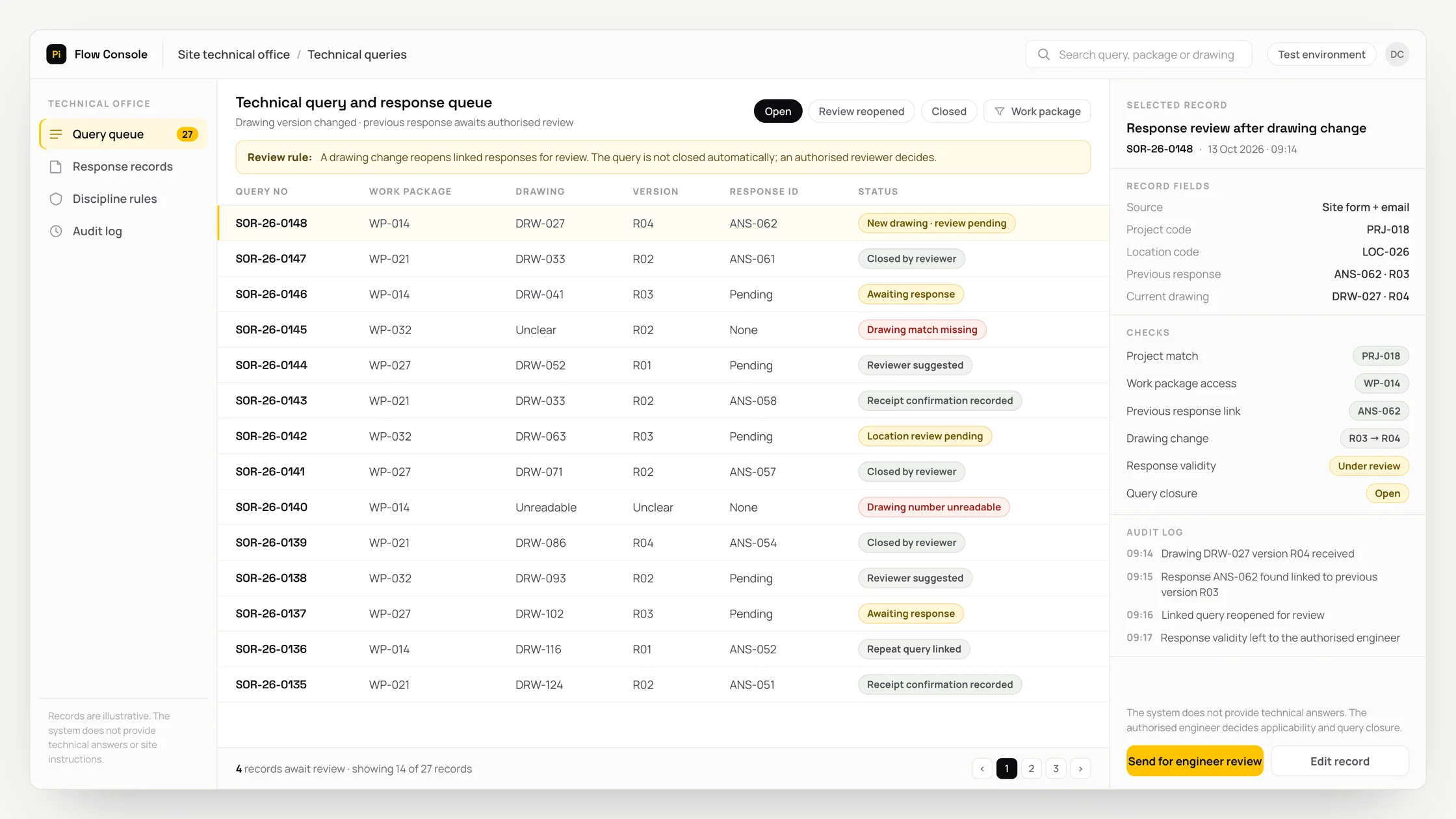
When a drawing changes, staff have to check separately which previous responses need another review.
What we set out to improve
- Whether each question links to the correct project, work package and drawing version
- Whether questions lacking an authorised response or receipt confirmation can be identified
- Whether responses affected by a new drawing version are reopened for review
How the system works
- 01Receive questions and attachments from WhatsApp or a form with the project, work package and record number. The WhatsApp connection uses only the official WhatsApp Business Platform.
- 02AI separates the subject of the query. OCR converts writing in an image into text and extracts possible drawing numbers, revisions and site locations.
- 03Combine attachments belonging to the same question. Present uncertain location matches and possible duplicate queries to the document controller.
- 04Use the organisation’s rules to suggest the responsible discipline reviewer and expected response date.
- 05Link the authorised engineer’s response to the source question and drawing version. Add confirmation that the response has been received.
- 06Reopen linked responses for review when a new drawing arrives. Complete the question when the authorised reviewer decides to close it.
Methods we used
- Combine messages, forms and email attachments in a shared query record.
- Use subject classification and document reading to suggest project, drawing version and location matches.
- Use the organisation’s discipline and authority lists to suggest a reviewer and expected response date.
- Build the review queue from links between questions, authorised responses and drawing versions.
Where people stay involved
The engineer provides the technical answer; the system does not produce instructions for site work. Applicability and closure remain the authorised reviewer’s decision. The document controller verifies uncertain locations, unreadable drawing details and duplicate matches. A response is not treated as valid without reliable version records and an authority list.
Data and security
Subcontractors can access only their own work packages. Faces and personal details in site photos are separated before reading, and project document permissions are preserved. The source question, response, drawing version and authorised corrections remain linked. Retention and deletion rules are defined with the organisation. WhatsApp notifications exclude sensitive documents; communication permissions, opt-out preferences and required message templates are applied.
Who this suits
A good fit
- Contractors working with several subcontractors and project offices
- Architecture and engineering firms tracking site queries against drawing versions
- Technical offices with a defined project repository, discipline reviewers and authority list
Not a good fit
- Teams whose existing system already tracks questions, responses and versions adequately
- Projects unable to establish shared records for drawing versions and work packages
- Teams unable to provide repository access and a list of authorised respondents
FAQ
Frequently asked questions
How is an email response linked to a site query?
The project and query reference connect the response to the relevant drawing version. Its source and receipt confirmation are kept with the question.
What happens to earlier responses when a drawing changes?
Responses linked to the changed drawing are reopened for review. The authorised reviewer assesses applicability and decides whether to close the question.
Does the same question with different attachments create another record?
Attachments belonging to the same question can be combined in one record. Uncertain duplicate matches go to the document controller.
Which project records are needed for setup?
The workflow needs project and work package codes, drawing version records, discipline reviewers and response authorities. Repository access is assessed during discovery.
Can we include questions received on WhatsApp?
Yes. The connection is designed around the official WhatsApp Business Platform. Form submissions and email responses can join the same record structure.
Project led by: DijitalPi
✦ PI ASSISTANT · ARTIFICIAL INTELLIGENCE
onlineAsk the DijitalPi AI Assistant your question
No need to fill in a form and wait for a reply — write your question and let Pi, trained on DijitalPi's 20 years of know-how, answer within seconds.
- Instant answers, 24/7
- Service-specific context — no generic replies
- Can connect you to a free consultation if you wish
Pi Assistant answers are for information purposes; for a proposal get in touch.
ASK AI ABOUT DIJITALPI
Let an AI explain what DijitalPi does.
Opens your chosen assistant with a ready research prompt. It reads the site live and answers.
 Cookie preferences
We use cookies to improve your experience and to analyse site traffic anonymously.Details: Cookie Policy · Privacy