
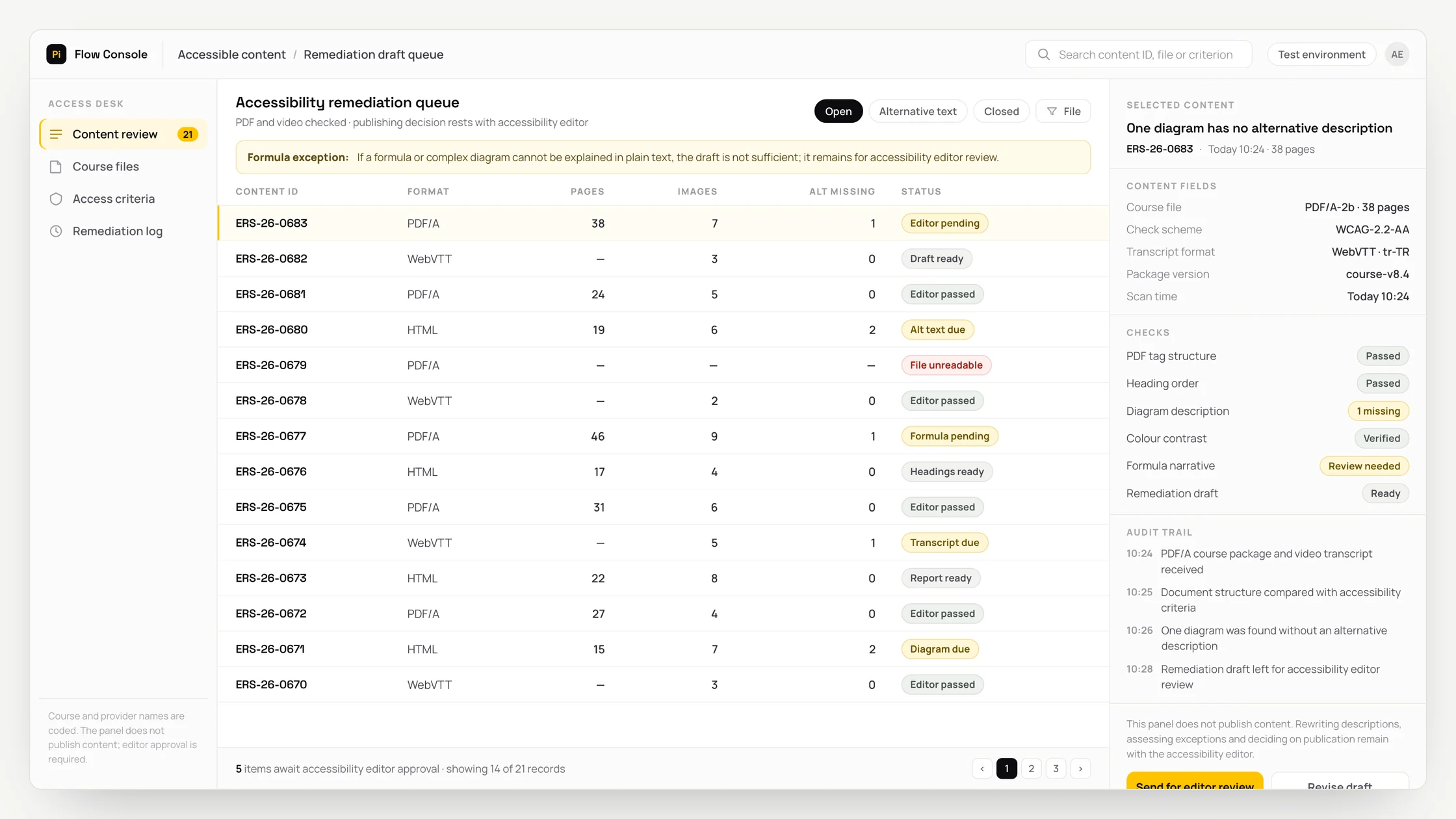
The problem
When the course PDF, video transcript and checklist are held in different sources, staff must match the fields manually before preparing the draft accessibility corrections.
The accessibility editor must compare every suggestion in the draft accessibility corrections with the source record; missing or conflicting evidence must not replace the final decision.
If a formula that cannot be described through simple alternative text is not routed for separate review, the resulting description could distort its technical meaning; the record must not proceed without a human decision.
What we set out to improve
- Time taken for the draft accessibility corrections and their supporting evidence to reach the accessibility editor for review
- Resolution outcomes for records routed to human review because a formula cannot be described through simple alternative text
- Number of suggestions corrected after identifying the risk of a description distorting the technical meaning
How the system works
- 01Retrieve the course PDF, video transcript and checklist from authorised sources
- 02Verify field and document versions
- 03Prepare the draft accessibility corrections with their supporting evidence
- 04Check the exception: a formula cannot be described through simple alternative text
- 05Have the accessibility editor accept, correct or reject the output
- 06Decision gate: whether the content is ready for publication
- 07Record the decision and source separately
Methods we used
- A source-identified data schema for the course PDF, video transcript and checklist
- A structure that separates deterministic rules from AI suggestions
- A screen showing the draft accessibility corrections alongside their supporting evidence
- A human review queue for formulae that cannot be described through simple alternative text
- A record identifier that prevents duplicate processing
Where people stay involved
The accessibility editor compares the draft accessibility corrections with the source record. If the exception condition occurs, the workflow stops because a formula cannot be described through simple alternative text. The accessibility editor decides whether the content is ready for publication.
Data and security
Only the necessary fields from the course PDF, video transcript and checklist should be processed. Role-based access must be applied, and unnecessary identity, health, financial and internal institutional data must not be sent to the model. Source retrieval, AI suggestions and the accessibility editor's decision must be logged separately.
Who this suits
A good fit
- Teams that regularly prepare draft accessibility corrections
- Institutions that manually combine course PDF, video transcript and checklist data
- Operations that keep the final decision with a person
Not a good fit
- When source data is not current
- When responsibility for the accessibility editor role is not defined
- When AI suggestions would be applied without review
FAQ
Frequently asked questions
What data is used?
The course PDF, video transcript and checklist are retrieved only from authorised sources. A field whose source and version cannot be identified is not treated as definitive information.
When does the process stop?
When a formula cannot be described through simple alternative text, the record is routed to the accessibility editor for review. If supporting evidence is missing, no change is made to the target record.
Does AI make the final decision?
No. The accessibility editor has authority over whether the content is ready for publication. Accept, correct and reject actions are logged as human decisions.
Project led by: DijitalPi
✦ PI ASSISTANT · ARTIFICIAL INTELLIGENCE
onlineAsk the DijitalPi AI Assistant your question
No need to fill in a form and wait for a reply — write your question and let Pi, trained on DijitalPi's 20 years of know-how, answer within seconds.
- Instant answers, 24/7
- Service-specific context — no generic replies
- Can connect you to a free consultation if you wish
Pi Assistant answers are for information purposes; for a proposal get in touch.
ASK AI ABOUT DIJITALPI
Let an AI explain what DijitalPi does.
Opens your chosen assistant with a ready research prompt. It reads the site live and answers.
 Cookie preferences
We use cookies to improve your experience and to analyse site traffic anonymously.Details: Cookie Policy · Privacy