
The problem
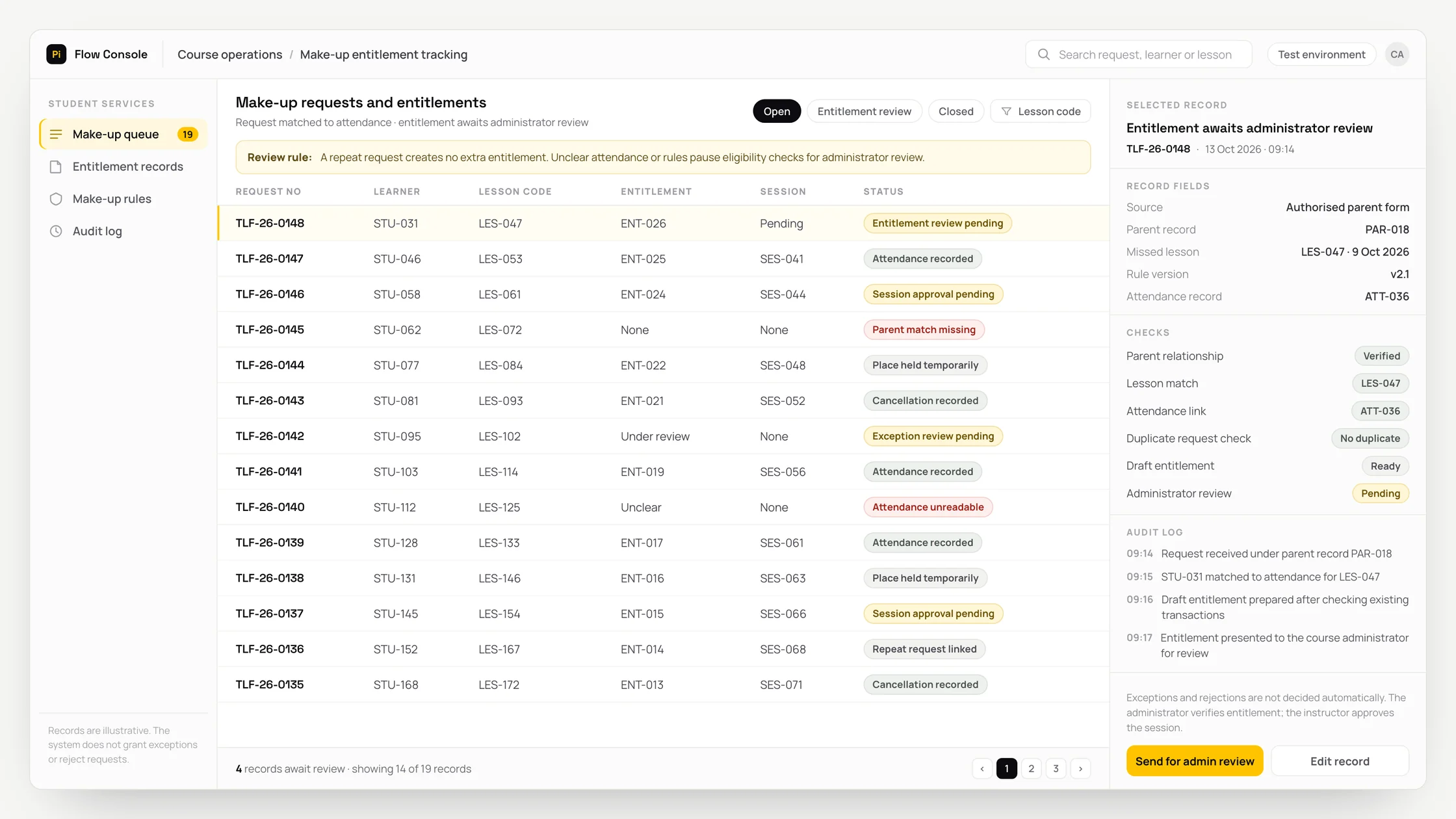
Staff manually compare a learner’s or parent’s make-up request with the teacher’s attendance list.
The administrator checks the provider’s rules and updates available entitlements in a separate list.
A repeat request for the same lesson requires staff to find earlier conversations and any place already reserved.
What we set out to improve
- Whether each request matches the correct learner, lesson and attendance record
- Whether a repeat request is tracked without creating another entitlement
- Whether reservations, attendance and cancellations update the entitlement consistently
How the system works
- 01Receive the request with a learner code and a verified learner or parent relationship. Use only the official WhatsApp Business Platform for WhatsApp messages; email and forms can also be connected.
- 02Extract the missed lesson, date and possible available times. Separate health-related explanations from the administrative record.
- 03Match the request to attendance and existing make-up records. Link duplicate requests to the existing record rather than creating another entitlement.
- 04Prepare a draft entitlement status and missing information list using the provider’s rules.
- 05The administrator verifies the entitlement. Temporarily reserve a place in a suitable session approved by the instructor.
- 06Update the entitlement when attendance or cancellation is recorded. Apply a record check to prevent simultaneous use of the same entitlement.
Methods we used
- Match lesson and date details from messages through learner and authorised parent records.
- OCR converts writing in an image into text; fields read from scanned attendance lists can be presented alongside the source for review.
- Prepare a draft eligibility result using the provider’s make-up rules and existing entitlement transactions.
- Use a calendar connection where available, or an approved session table to track reservations and entitlement transactions.
Where people stay involved
The administrator verifies the entitlement. Exceptional entitlements, rejections and session decisions remain with the administrator and education coordinator. The instructor approves the suitable session. Unreadable attendance or date fields stay blank. No eligibility result is prepared without current attendance, lesson identifiers and entitlement rules.
Data and security
A child’s record is linked only to an authorised parent or guardian. Medical reports are not requested; unsolicited health content is separated from administrative records for authorised review. Processing uses only necessary fields and preserves links between sources, matches and corrections. Access, retention and deletion rules are defined with the provider. WhatsApp communication respects permissions and opt-out preferences, uses required templates and excludes sensitive content from notifications.
Who this suits
A good fit
- Language, music and art course providers offering make-up lessons
- Providers with current attendance, lesson identifiers and make-up rules
- Teams with an administrator and education coordinator to verify entitlements and session choices
Not a good fit
- Providers that do not offer make-up lessons
- Providers whose existing software already tracks entitlements and duplicate requests adequately
- Teams unable to establish shared attendance, authorised parent and make-up rule records
FAQ
Frequently asked questions
Which rules determine a make-up entitlement?
The provider’s defined rules, attendance and previous entitlement transactions are used. The administrator verifies the resulting draft status.
What happens if someone requests the same lesson twice?
The repeat request is linked to the existing lesson and make-up record. No extra entitlement is created, and reservation checks prevent the same entitlement being used for another session at the same time.
Can we start without calendar software?
Yes. An approved table of instructor-approved sessions can be used. Availability of a calendar connection is assessed during discovery.
How is entitlement tracked after a make-up session is cancelled?
The cancellation is recorded against the relevant entitlement transaction. Its status is updated using the provider’s defined rules and tracked separately from attendance.
How is a parent’s request linked to the right learner?
The request is matched using the recorded parent relationship and learner code. Access to a child’s record relies on that verified relationship.
Project led by: DijitalPi
✦ PI ASSISTANT · ARTIFICIAL INTELLIGENCE
onlineAsk the DijitalPi AI Assistant your question
No need to fill in a form and wait for a reply — write your question and let Pi, trained on DijitalPi's 20 years of know-how, answer within seconds.
- Instant answers, 24/7
- Service-specific context — no generic replies
- Can connect you to a free consultation if you wish
Pi Assistant answers are for information purposes; for a proposal get in touch.
ASK AI ABOUT DIJITALPI
Let an AI explain what DijitalPi does.
Opens your chosen assistant with a ready research prompt. It reads the site live and answers.
 Cookie preferences
We use cookies to improve your experience and to analyse site traffic anonymously.Details: Cookie Policy · Privacy