
The problem
Staff manually compare correction notes and scanned job sheets submitted by clinics with the original job card.
When repeat requests and additional changes are not tracked separately, technicians have to ask which revision to prepare.
Production, return dispatch and clinic receipt are recorded separately, so finding the latest version’s status requires a call.
What we set out to improve
- Whether each request links to the correct laboratory job code and previous revision
- Whether duplicate requests can be distinguished from additional changes
- Whether approved scope, return dispatch and clinic receipt can be found in the same revision record
How the system works
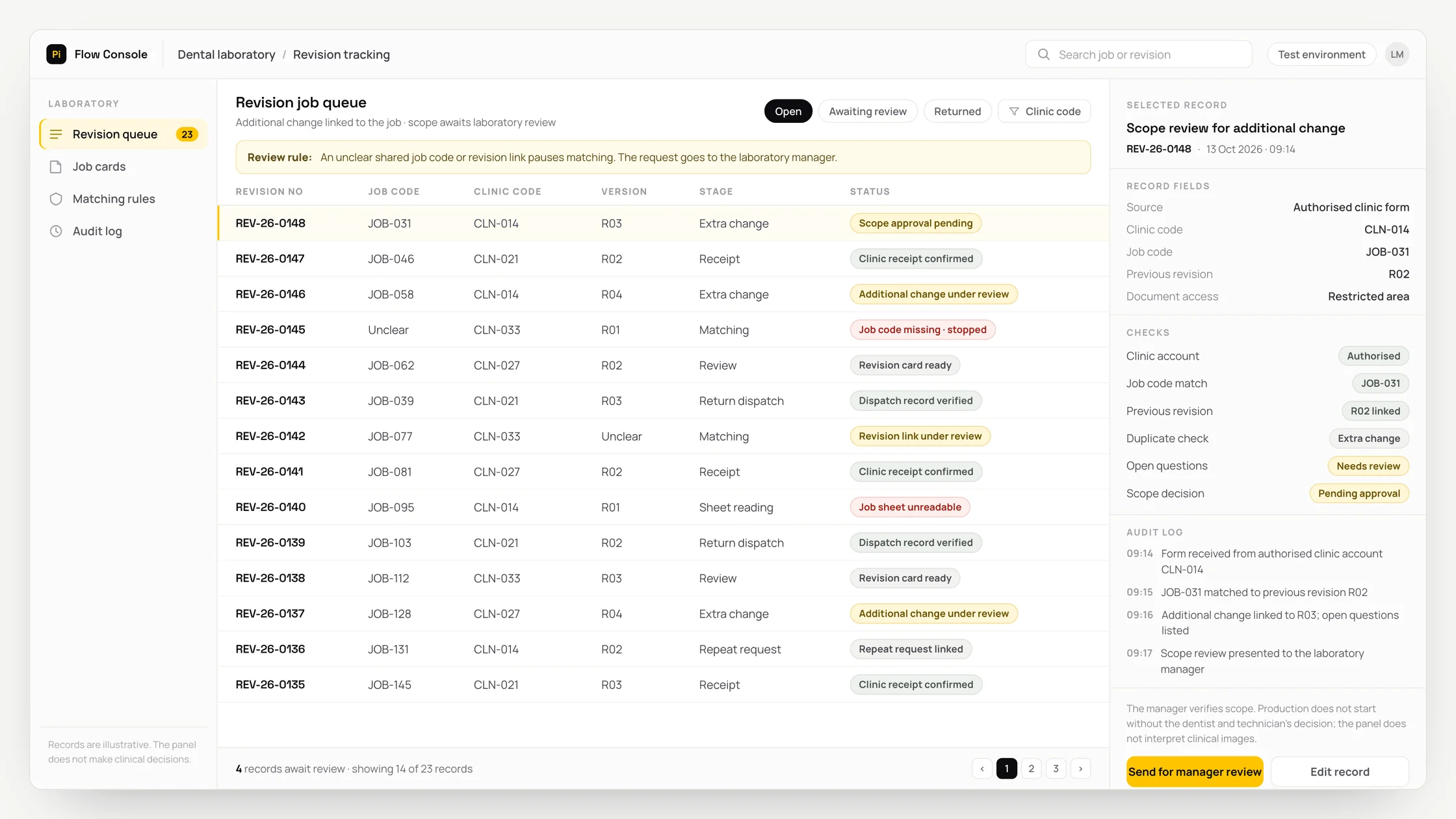
- 01Receive the form from an authorised clinic account with the laboratory job code and revision reference.
- 02Separate documents linked to patient identity into restricted storage. Show only the job code in the administrative queue.
- 03OCR converts writing in a scanned document into text. In an authorised reading environment, extract proposed revision details and the requested delivery date from the job sheet and note.
- 04Link the request to the previous revision. Attach repeat submissions to the existing record and show additional changes separately.
- 05Prepare a revision job card and a list of open questions for the technician. Present extracted fields alongside their source notes.
- 06The responsible person approves the scope. Track production, return dispatch and the clinic’s receipt confirmation in the same revision record.
Methods we used
- Match requests through the authorised form, clinic record and laboratory job code.
- Limit document reading and text extraction to revision details and the requested delivery date.
- Organise the revision sequence using previous revision links and duplicate checks.
- Keep the scope decision, production status, return dispatch and receipt confirmation in a shared job card.
Where people stay involved
The laboratory manager verifies the revision scope. Clinical suitability, design changes and release to production remain with the dentist and authorised technician; the system does not interpret X-rays or clinical images. Requests without a shared job code and unclear technical abbreviations go for review, with uncertain fields left blank.
Data and security
Health information is kept separate from general storage and general-purpose document reading. Using a job code does not make data anonymous. Processing conditions, access, transfers, retention and deletion are assessed with the organisation. Staff review job sheets until an authorised reading environment is available. Health content is received through the authorised form, not WhatsApp. Links between source documents, extracted fields and authorised corrections are preserved.
Who this suits
A good fit
- Dental laboratories receiving regular revision requests from several clinics
- Teams able to use shared job codes and revision references with clinics
- Laboratories with a designated owner for revision scope and return delivery tracking
Not a good fit
- Laboratories whose existing job cards already track revisions in sufficient detail
- Processes where the clinic and laboratory cannot establish a shared job code
- Businesses unable to provide restricted access and an authorised reading environment for health information
FAQ
Frequently asked questions
How does a clinic submit a request?
An authorised clinic user enters the job code and revision reference in a web form. The correction note and scanned job sheet are attached to the same request.
What happens if the same correction note is sent again?
The repeat submission is linked to the existing revision record. A note containing an additional change is shown separately so the technician can distinguish it.
How are handwritten job sheets handled?
The sheet can be converted to text in the authorised environment. If a technical abbreviation is unreadable, the field stays blank and the source sheet is presented to the reviewer.
Can we see which revision was returned to the clinic?
Yes. The proposed job card keeps production and return dispatch status for the approved revision alongside the clinic’s receipt confirmation.
Which records should we prepare for setup?
The workflow needs an authorised clinic list, shared laboratory job codes and previous revision records. Document access and the reading environment are assessed alongside those records.
Project led by: DijitalPi
✦ PI ASSISTANT · ARTIFICIAL INTELLIGENCE
onlineAsk the DijitalPi AI Assistant your question
No need to fill in a form and wait for a reply — write your question and let Pi, trained on DijitalPi's 20 years of know-how, answer within seconds.
- Instant answers, 24/7
- Service-specific context — no generic replies
- Can connect you to a free consultation if you wish
Pi Assistant answers are for information purposes; for a proposal get in touch.
ASK AI ABOUT DIJITALPI
Let an AI explain what DijitalPi does.
Opens your chosen assistant with a ready research prompt. It reads the site live and answers.
 Cookie preferences
We use cookies to improve your experience and to analyse site traffic anonymously.Details: Cookie Policy · Privacy