
The problem
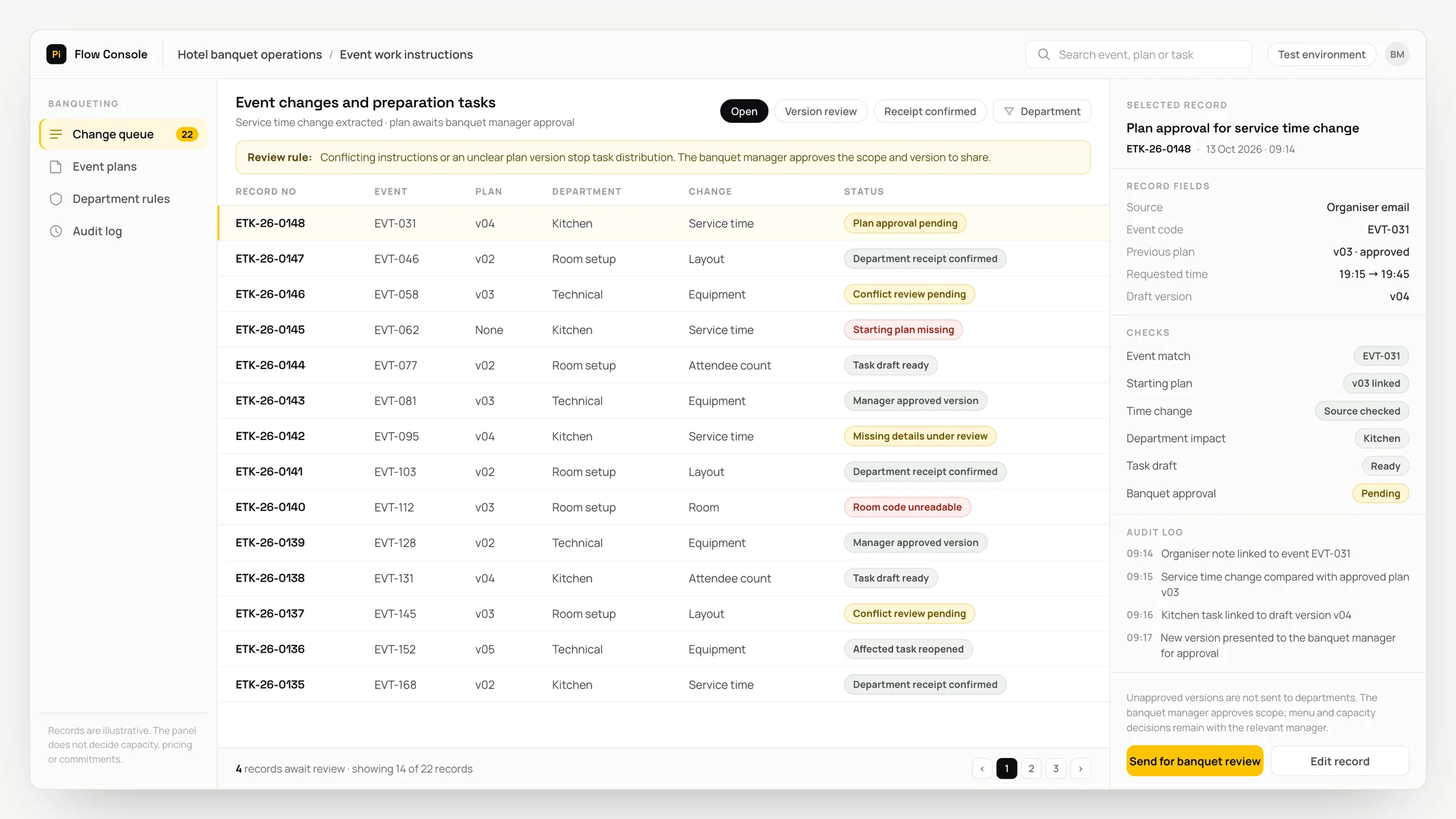
Room layouts, service times and equipment changes accumulate in email attachments and WhatsApp messages.
The banquet manager transfers each change separately to kitchen, room setup and technical team lists.
Staff have to confirm separately that teams received the same plan version and saw the changed preparation tasks.
What we set out to improve
- Whether changes match the correct event and approved starting plan
- Whether departmental instructions use the same approved plan version
- Whether missing receipt confirmations and open tasks affected by changes are visible
How the system works
- 01Link messages and documents received by email or WhatsApp to the event code and approved starting plan. Use only the official WhatsApp Business Platform for WhatsApp.
- 02OCR converts writing in scanned documents into text. Extract times, rooms, layouts, attendee counts and equipment requests from messages and plans.
- 03Compare the new request with the previous plan. Flag conflicting instructions and missing details.
- 04Use the hotel’s work rules to prepare the effect of each change on kitchen, room setup and technical service tasks.
- 05The banquet manager approves the scope and latest version. Create departmental work instructions linked to that same version.
- 06Track departmental receipt confirmations and open preparation tasks. Reopen affected tasks for review when another change arrives.
Methods we used
- Match messages, documents and the starting plan through the event code.
- Use text extraction and document reading to show changed fields alongside their sources.
- Compare plan versions to prepare task drafts for affected departments.
- Keep the approved version, departmental instructions and receipt confirmations together in the hotel’s event table.
Where people stay involved
The banquet manager approves the scope and plan version to share. Menu, capacity, technical suitability, price and commitment decisions remain with the relevant managers. The system does not calculate capacity from drawings or interpret health information. Uncertain times and attendee counts go for review; tasks are not distributed without a defined event version and departmental owners.
Data and security
Attendee lists and special requests have separate access permissions. Health and allergy notes are kept off the general event board and restricted to the authorised service manager. Sensitive content is separated before reading, and processing uses only fields needed for the task. Links between source documents, versions and authorised corrections are preserved; retention and deletion rules are defined with the hotel. WhatsApp communication respects permissions, opt-out preferences and required templates; notifications exclude sensitive content.
Who this suits
A good fit
- Hotels hosting meetings, weddings or corporate events
- Banquet teams sharing plan changes with kitchen, room setup and technical teams
- Businesses with defined event versions and departmental owners
Not a good fit
- Hotels without an event preparation operation
- Teams whose existing event software already tracks versions, tasks and receipts adequately
- Businesses unable to establish shared event codes and an approved starting plan
FAQ
Frequently asked questions
Which tasks change when the service time changes?
The effect on kitchen, room setup and technical tasks is prepared using the hotel’s work rules. The banquet manager approves the scope and new plan version.
Can we see whether teams received the same plan?
Yes. Each department’s instructions link to the approved plan version. Receipt confirmations and open preparation tasks are tracked through that link.
Can we start without connecting the hotel software?
Yes. An event table containing event codes, plan versions and departmental owners can be used. Software connections are assessed during discovery.
How are conflicting organiser notes handled?
The new note is compared with the previous plan and conflicting fields are flagged. The banquet manager clarifies the scope and approves the version to share.
What happens if another change arrives after approval?
The affected task is reopened for review. Departmental instructions are linked to the version approved by the banquet manager.
Project led by: DijitalPi
✦ PI ASSISTANT · ARTIFICIAL INTELLIGENCE
onlineAsk the DijitalPi AI Assistant your question
No need to fill in a form and wait for a reply — write your question and let Pi, trained on DijitalPi's 20 years of know-how, answer within seconds.
- Instant answers, 24/7
- Service-specific context — no generic replies
- Can connect you to a free consultation if you wish
Pi Assistant answers are for information purposes; for a proposal get in touch.
ASK AI ABOUT DIJITALPI
Let an AI explain what DijitalPi does.
Opens your chosen assistant with a ready research prompt. It reads the site live and answers.
 Cookie preferences
We use cookies to improve your experience and to analyse site traffic anonymously.Details: Cookie Policy · Privacy