
The problem
Customers send damage photos, accident reports, vehicle registration documents, driving licences, old policies, repair invoices and loss adjuster reports through WhatsApp. The files remain on phones and in chat histories.
Staff download, rename and move each attachment by hand. Different naming habits leave the same customer’s documents scattered across folders.
When a document is needed, its customer, policy or claim may be unclear. Colleagues working on the same case have to search the conversations again.
What we set out to improve
- Whether incoming documents can be found under the correct customer, policy and claim
- Consistency with the agency’s folder structure and file naming rules
- Correct handling of review cases and links between duplicate messages and existing files
How the system works
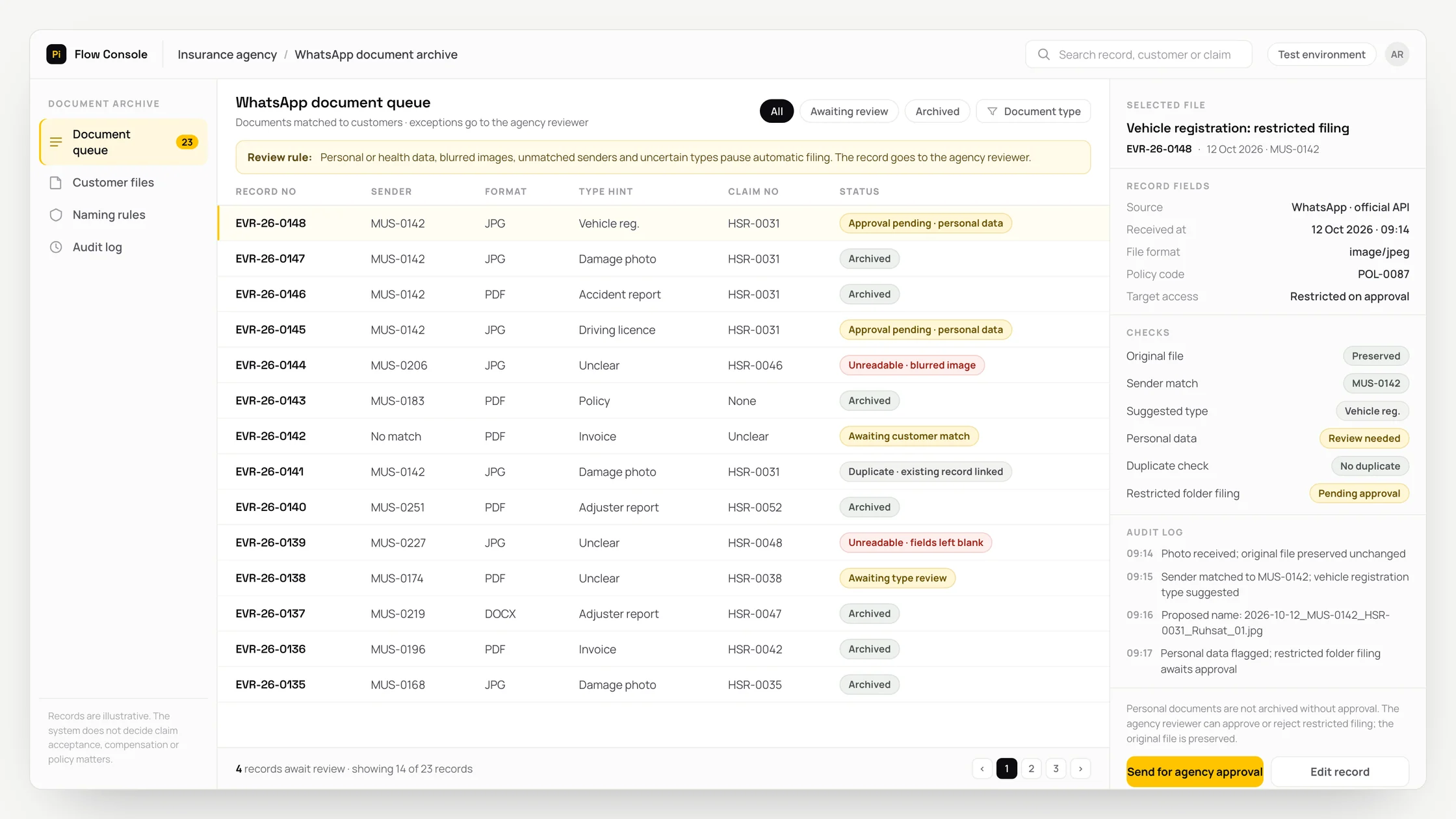
- 01Receive messages, photos and PDF or Office documents through the agency’s official WhatsApp Business Platform number. Cloud API is the official connection that passes messages from that number to the workflow. Preserve the original file unchanged.
- 02Match the sender’s number against the agency’s customer system or list. If there is no match, place the record in the approval queue; show any policy number read from the document as evidence for a suggested match.
- 03Suggest a document type from the agency’s list: damage photo, accident report, vehicle registration, driving licence, policy, invoice or loss adjuster report.
- 04OCR converts text in an image into readable text. Use it to extract fields such as the policy number, accident date and policy expiry date from images and PDFs, leaving unreadable fields blank.
- 05Assign eligible files a name and folder using the agency’s rules. An example folder structure is Customers / Customer code / Policy / Claim. An example filename is 2026-10-12_MUS-0142_HSR-0031_HasarFoto_01.jpg, ordered by date, customer, case, type and sequence. HasarFoto is the agency’s example code for a damage photo.
- 06File the document in the storage chosen during discovery: Google Drive, SharePoint/OneDrive, the agency’s server or S3-compatible storage. S3 compatibility means the storage supports a common file connection format.
- 07Write the sender, date, document type, extracted fields, file link and reviewer, where applicable, to the archive record.
- 08Send a receipt acknowledgement within WhatsApp’s 24-hour customer service window. The message confirms receipt of the file only.
Methods we used
- Connect message receipt, customer matching, file naming and storage in an n8n workflow.
- Match the sender’s number against customer records, using the policy number read from the document as supporting evidence.
- Keep type suggestions within the agency’s document list and extract only the fields needed for filing.
- Link a repeat message to the existing archive record instead of creating another copy of the same file.
- Organise documents by customer, policy and claim so they can serve as inputs to a separate claim document pre-review workflow.
Where people stay involved
Human approval controls access to sensitive documents and resolves uncertain filing decisions. Documents containing personal or health information, including vehicle registration documents, driving licences and identity documents, go to the agency’s reviewer, as do blurred images, unmatched senders and uncertain type suggestions. Personal data is filed in a separate restricted folder after approval. Other files can be archived directly when the rules are met. The system does not decide claim acceptance, compensation or policy matters. Those decisions remain with the agency and insurer, and no such decision or commentary is sent to the customer.
Data and security
Only fields needed for the archive are processed. Content sent to AI is limited to what is needed to suggest a document type and read those fields. Existing storage permissions are preserved, and retention follows the agency’s policy. Receipt, classification, corrections and approvals are recorded in the audit log. The system does not delete files or overwrite existing ones. Rejecting a file for archiving preserves the original received attachment.
Who this suits
A good fit
- Insurance agencies and intermediaries that regularly receive documents through WhatsApp
- Teams where several staff members work on the same customer file
- Agencies with a designated owner who can define folder and file naming rules
Not a good fit
- Document volumes are low enough for the existing filing process
- Documents already arrive in a structured form through a portal or email
- The agency has no WhatsApp Business Platform account; account setup is needed first
FAQ
Frequently asked questions
Can I use my personal WhatsApp number?
No. This workflow uses the agency’s official WhatsApp Business Platform number. It does not use unofficial services that imitate WhatsApp Web, which risk the number being blocked.
Who chooses the filenames and folder structure?
The agency sets the rules. Filenames can include the date, customer code, claim reference, document type and sequence number. These rules are defined alongside the agency’s customer and policy records during setup.
What happens if a customer sends a blurred photo?
The file is marked unreadable and any fields that cannot be read stay blank. The agency’s reviewer can request a clearer photo, file the attachment as received or reject it for archiving.
Where are files stored, and who can see them?
Files stay in storage chosen by the agency. Options assessed during discovery include Google Drive, SharePoint/OneDrive, the agency’s server and S3-compatible storage. Access follows the storage permissions granted to authorised staff. Documents containing personal data are kept in a separate restricted folder.
Does the workflow also archive voice messages?
This workflow covers photos and documents. Archiving voice messages would need a separate assessment.
Project led by: DijitalPi
✦ PI ASSISTANT · ARTIFICIAL INTELLIGENCE
onlineAsk the DijitalPi AI Assistant your question
No need to fill in a form and wait for a reply — write your question and let Pi, trained on DijitalPi's 20 years of know-how, answer within seconds.
- Instant answers, 24/7
- Service-specific context — no generic replies
- Can connect you to a free consultation if you wish
Pi Assistant answers are for information purposes; for a proposal get in touch.
ASK AI ABOUT DIJITALPI
Let an AI explain what DijitalPi does.
Opens your chosen assistant with a ready research prompt. It reads the site live and answers.
 Cookie preferences
We use cookies to improve your experience and to analyse site traffic anonymously.Details: Cookie Policy · Privacy