
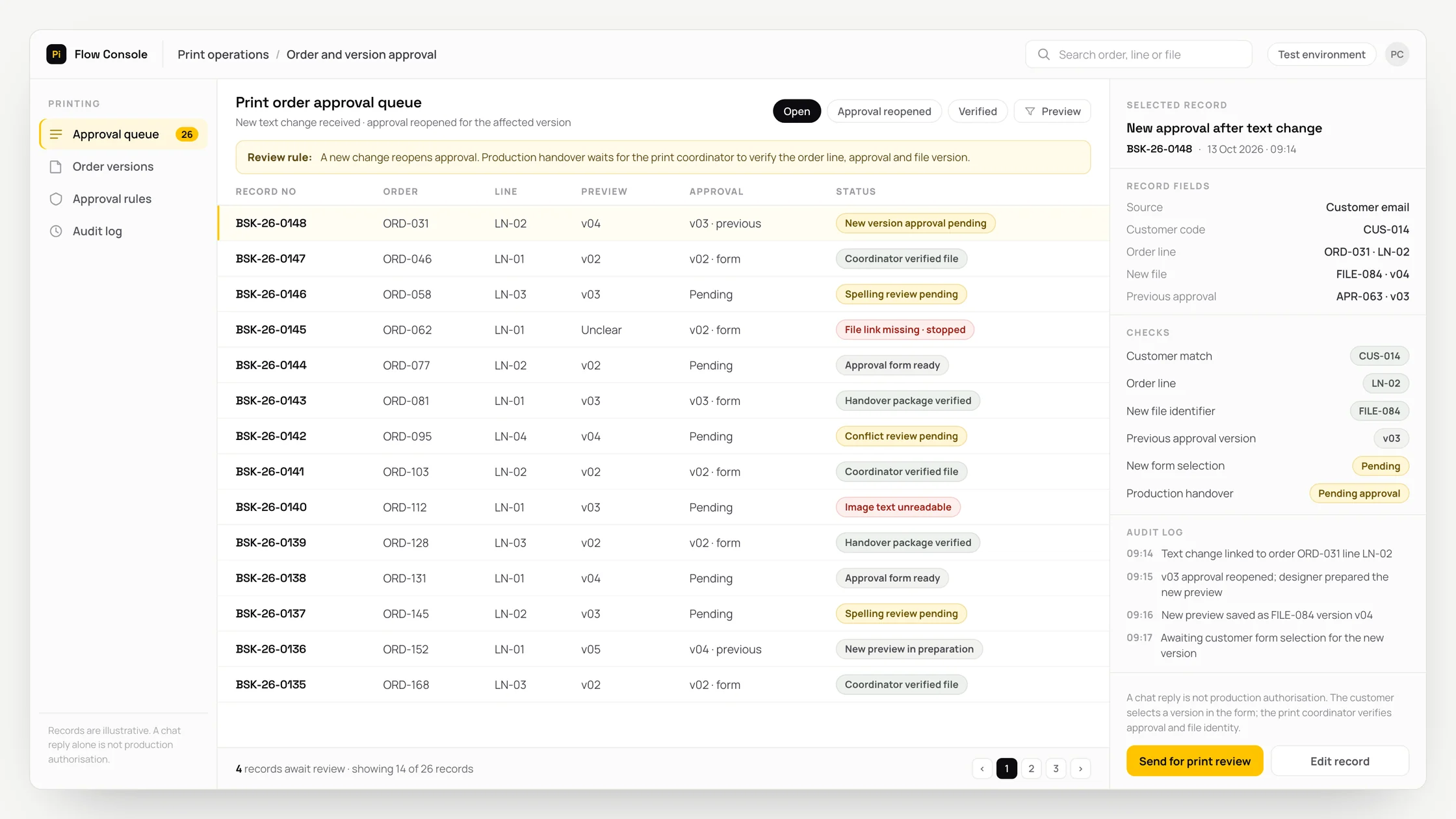
The problem
Names, text and images submitted in an order form change through later WhatsApp or email corrections.
The print coordinator searches separate messages for the latest text and the preview the customer accepted.
When another change arrives, staff manually compare the previously approved file with the production file version.
What we set out to improve
- Whether change requests match the correct customer and order line
- Whether explicit customer approval links to a specific preview version and file identifier
- Whether further changes reopen the relevant approval and the production package contains the correct version
How the system works
- 01Link order form text, files and subsequent messages to the authorised customer record and order line. Use only the official WhatsApp Business Platform for the WhatsApp connection.
- 02AI separates change requests into proposed text, colour, layout and quantity fields.
- 03Flag conflicting requests and unreadable text for review. Preserve the source spelling without automatically correcting names.
- 04Assign a version and file identifier to the preview prepared by the designer. Present a controlled approval form to the customer.
- 05Link the explicit form selection to the order line and preview version. Review chat replies separately; a chat reply alone is not final approval.
- 06The print coordinator verifies customer approval against the file identifier before a production handover package is prepared. A new change reopens the relevant approval.
Methods we used
- Combine forms, emails and messages through the customer record and order line.
- Extract changed fields from text. OCR converts writing in images into text, allowing embedded wording to be presented alongside its source for review.
- Keep the preview version, file identifier and controlled form selection in the same approval record.
- Check the version link between approval and the production file to prepare the handover package.
Where people stay involved
Design, print suitability, file usage rights and release to production remain with the designer and print coordinator. The customer makes an explicit selection in the controlled form; a short positive chat message is not production authorisation. The package is not transferred unless the version link between order line, approval session and production file can be verified. Staff resolve unclear spelling and conflicting requests.
Data and security
Customer photos and personal names are accessible only to the relevant order team. No facial recognition or biometric matching is performed. Sensitive content is separated before reading; necessary fields, source files and authorised corrections remain linked. Retention and deletion rules are defined with the business. WhatsApp communication respects permissions, opt-out preferences and required templates, directing users to an authorised form instead of sharing sensitive content.
Who this suits
A good fit
- Businesses selling personalised gifts and invitations
- Textile printing and promotional product teams using customer preview approval
- Businesses able to track order lines, customers and print file versions together
Not a good fit
- Orders requiring neither personalisation nor customer preview approval
- Teams whose existing order system already links approvals and production file versions adequately
- Businesses unable to establish shared identifiers for order lines and file versions
FAQ
Frequently asked questions
Does a customer saying OK in chat count as approval?
No. Approval links an explicit selection in the controlled form to a particular order line and preview version. The chat message stays in the record for review.
What if the customer changes the wording after approval?
The relevant approval is reopened. The changed preview version is matched to the customer’s selection again, and the print coordinator checks the file identifier.
Does the system correct spelling mistakes in names?
No. The original spelling is preserved. Unreadable or conflicting names are presented to staff for clarification.
Who prepares the print preview?
The designer prepares it. The workflow assigns the file a version and identifier, then tracks which preview the customer selects.
Which file goes into the production handover package?
The package contains the version whose identifier the print coordinator has matched to customer approval. The link between the order line, approval session and file is verified before release.
Project led by: DijitalPi
✦ PI ASSISTANT · ARTIFICIAL INTELLIGENCE
onlineAsk the DijitalPi AI Assistant your question
No need to fill in a form and wait for a reply — write your question and let Pi, trained on DijitalPi's 20 years of know-how, answer within seconds.
- Instant answers, 24/7
- Service-specific context — no generic replies
- Can connect you to a free consultation if you wish
Pi Assistant answers are for information purposes; for a proposal get in touch.
ASK AI ABOUT DIJITALPI
Let an AI explain what DijitalPi does.
Opens your chosen assistant with a ready research prompt. It reads the site live and answers.
 Cookie preferences
We use cookies to improve your experience and to analyse site traffic anonymously.Details: Cookie Policy · Privacy